ts driving licence download pdf
If you're a resident of Telangana (TS), accessing your driving licence online has never been easier. The Telangana Transport Department has streamlined the process, allowing you to download your driving licence PDF, check the driving licence status, renew your licence, and more, all from the comfort of your home. In this pillar page, we'll cover everything you need to know about driving licence download in Telangana, including the step-by-step process, the required documents, and other related services.
What is a Driving Licence in Telangana?
A driving licence is a legal permit that allows individuals to operate motor vehicles on public roads. Issued by the Motor Vehicle Department (MVD) of Telangana, a driving licence is required for anyone wanting to drive vehicles such as cars, motorcycles, or heavy motor vehicles.
In Telangana, you can easily apply for, renew, and manage your driving licence online using platforms like Parivahan Sewa and mParivahan. You can also download your driving licence in PDF format directly from these portals.
Why Download Your TS Driving Licence?
Downloading your TS driving licence online can be incredibly useful for several reasons:
- Convenience: Having a digital copy of your driving licence means you can access it anytime on your phone or computer, making it easy for verification during traffic checks or when needed for other purposes.
- Lost Licence: If your physical licence is lost or damaged, a downloaded version can act as a temporary backup.
- Official Use: You may need a driving licence download when applying for vehicle insurance, loans, or other official documentation.
How to Download Your TS Driving Licence
Downloading your driving licence in Telangana is a simple process, and you can do it online in just a few easy steps. You can access your TS driving licence through the Parivahan Sewa portal or the mParivahan app .
1. Download Your TS Driving Licence from the Parivahan Sewa Website
- Step 1: Visit the Parivahan Sewa Website Go to the official Parivahan Sewa website: https://parivahan.gov.in.
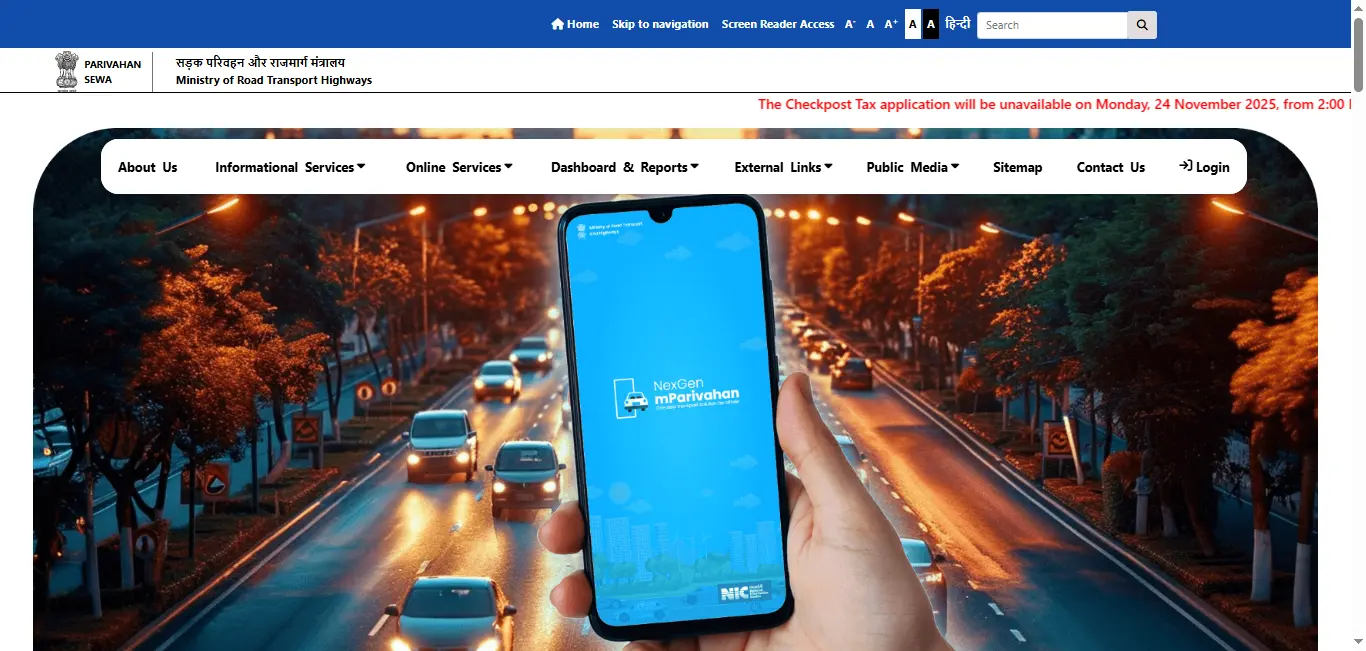
- Step 2: Navigate to the Driving Licence Services Click on the "Online Services" tab at the top of the page and select "Driving License Related Services".
- Step 3: Select Telangana as Your State On the next page, choose Telangana from the drop-down list of states.
- Step 4: Enter Your Details You will need to enter either your Driving Licence Number or Date of Birth to retrieve your driving licence details.
- Step 5: Download the Driving Licence PDF Once your details are verified, you will be able to see your driving licence information. Click the "Download PDF" option to save a digital copy of your TS driving licence.
2. Download Your TS Driving Licence via the mParivahan App
Another easy way to download your TS driving licence is by using the mParivahan app, which is available for both Android and iOS devices.
- Step 1: Install the mParivahan App Download and install the from the Google Play Store or Apple AppStore.
- Step 2: Select Telangana as Your State Once you open the app, select Telangana as your state.
- Step 3: Enter Your Driving Licence Information Input either your Driving Licence Number or Date of Birth to retrieve your driving licence details.
- Step 4: Download the Licence After entering your details, you'll see an option to download your TS driving licence in PDF format directly to your device.
Other Services for Managing Your TS Driving Licence
In addition to downloading your driving licence, there are other important services that you can access online to manage your driving licence in Telangana.
1. Apply for a New Driving Licence in Telangana
If you don't yet have a driving licence in Telangana, you can apply for one online. Here's how:
Eligibility Criteria:
- You must be at least 18 years old to apply for a private vehicle licence (LMV).
- You need to have held a learner's licence for at least 30 days before applying for a permanent driving licence.
Documents Required:
- Aadhaar card or other identity proof.
- Address proof (e.g., utility bill, bank statement).
- Passport-sized photographs.
- Age proof (e.g., birth certificate, passport).
Application Process:
- Visit the Parivahan Sewa portal and complete the online driving licence application.
- Submit documents and pay the application fee online.
- Schedule your driving test: Once your application is submitted, you will need to schedule a driving test at your nearest RTO.
- Take the test: After successfully passing the test, your driving licence will be issued, and you can download it via the Parivahan portal or the mParivahan app.
2. Check Your TS Driving Licence Application Status
If you've applied for a driving licence and want to know its status, you can check it online.
- Step 1: Go to the Parivahan Sewa Portal or use the mParivahan app.
- Step 2: Select "Driving Licence Application Status" from the services menu.
- Step 3: Enter your application number and date of birth to check the status of your application.
3. Renew Your TS Driving Licence
In Telangana, driving licences are typically valid for 20 years for individuals under the age of 50, and for 5 years for senior citizens. To renew your driving licence, follow these steps:
- Visit the Parivahan Sewa website or the mParivahan app.
- Choose the renewal service and enter your details.
- Upload your expired licence and any necessary documents.
- Pay the renewal fee online.
- After completing the process, your renewed driving licence will be sent to your address, and you can download it online.
4. Change Address on Your Driving Licence
If you've changed your address, you can update your driving licence details online in Telangana.
- Log in to the Parivahan portal and select "Change of Address".
- Upload the required address proof documents.
- Pay the necessary fee and submit your application.
- Once processed, your updated driving licence will be sent to your new address.
Know the complete process how to change address on driving licence
5. Apply for a Duplicate Driving Licence
If your driving licence is lost or damaged, you can apply for a duplicate driving licence online.
- File a police report (optional but recommended if lost).
- Visit the Parivahan Sewa portal and select "Duplicate Driving Licence".
- Submit the required documents, including a police report (if applicable), proof of identity, and a passport-sized photograph.
- Pay the required fee, and you will receive your duplicate driving licence by mail.
Driving Licence Download By States
Conclusion
Downloading and managing your driving licence in Telangana has become incredibly easy with the availability of online services like Parivahan Sewa and the mParivahan app. Whether you're downloading your driving licence, applying for a duplicate licence, or checking your driving licence status, these platforms offer convenient, fast, and secure services. Take advantage of these tools to simplify your experience with the Telangana Transport Department and manage your driving licence needs with ease.
Frequently Asked Questions
1.How do I download my TS driving licence online?
You can easily download your TS driving licence by visiting the Parivahan Sewa portal or using the mParivahan app. Enter your Driving Licence Number or Date of Birth to retrieve and download the PDF version.
2.Can I renew my driving licence online in Telangana?
Yes, you can renew your driving licence online in Telangana through the Parivahan Sewa portal or the mParivahan app. Simply upload the required documents and pay the fee to complete the process.
3.What documents are required to apply for a new driving licence in Telangana?
The documents required for applying for a new driving licence in Telangana include: Aadhaar card or other ID proof, Proof of address (e.g., utility bill), Passport-sized photographs, and Age proof (e.g., birth certificate, passport).
4.How do I check the status of my TS driving licence application?
You can check the status of your driving licence application by visiting the Parivahan Sewa portal or using the mParivahan app. Simply enter your application number and date of birth.
5.What should I do if I lose my driving licence?
If you lose your driving licence, you can apply for a duplicate licence through the Parivahan Sewa portal. You may also need to file a police report (if applicable).