MP Driving Licence Download
Getting your MP driving licence download online is a simple and efficient process, thanks to the services offered by Madhya Pradesh's transport department. Whether you're looking to apply for a new driving licence, renew your existing one, or download a duplicate licence, everything is possible with a few clicks. This guide will help you navigate through all the essential steps to ensure a smooth experience with driving licence download MP.
1. How to Download Your MP Driving Licence
To download driving licence MP online, you need to follow a straightforward process through the official Parivahan Sewa website or the MP RTO portal.
Steps to Download MP Driving Licence:
- Visit the Official Parivahan Sewa Website: Go to the official portal Parivahan Sewa.
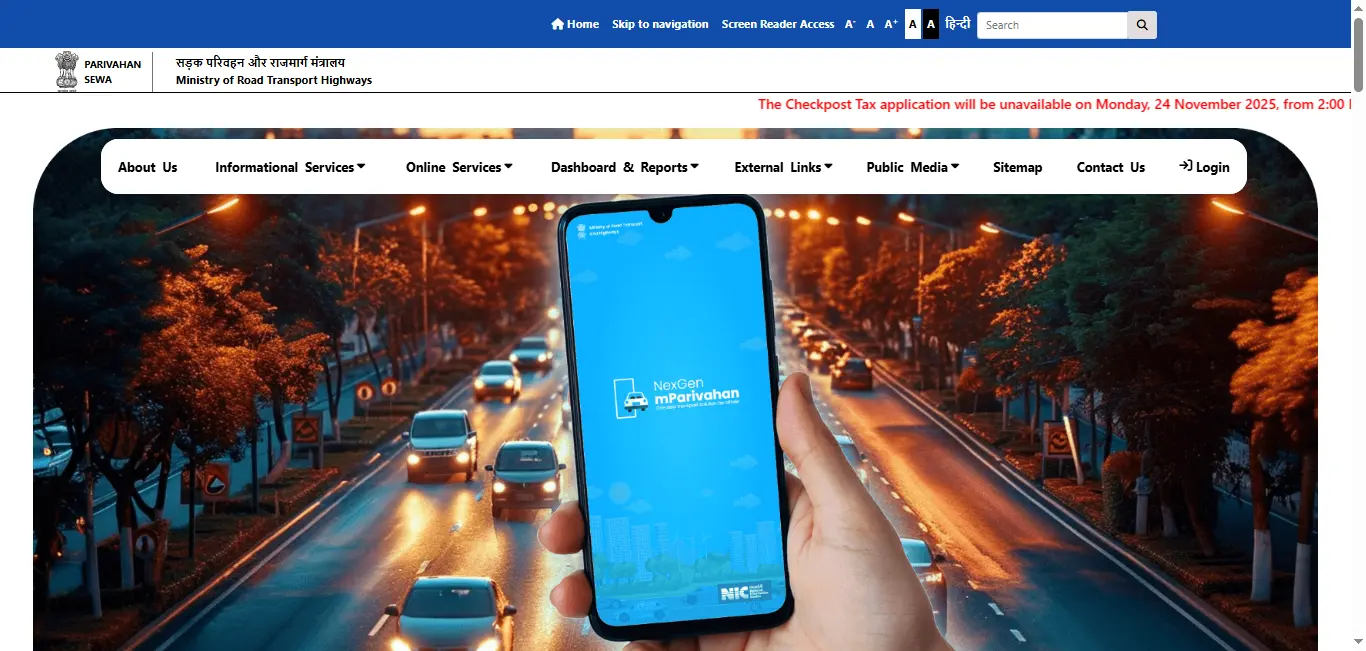
- Navigate to the Driving Licence Section: Select "Driving License Related Services" under the "Online Services" section.
- Choose Madhya Pradesh as Your State: Select Madhya Pradesh (MP) from the drop-down menu.
- Enter Your Details: You can either enter your Driving Licence Number or Date of Birth to retrieve your details.
- Download the PDF: After your details are verified, click on the "Download" option to save the MP driving licence PDF on your device.
Driving Licence Download By States
2. How to Apply for a New MP Driving Licence
If you're a resident of Madhya Pradesh, applying for a new driving licence MP is easy, whether for a light motor vehicle(LMV) or heavy motor vehicle(HMV).
Steps to Apply for a New Driving Licence in MP:
- Go to the Parivahan Sewa Website: Visit the official website to begin the MP driving licence apply process.
- Fill Out the Application Form: Complete the online Driving Licence Application Form.
- Upload Required Documents: Attach proof of identity, address, age, and passport-sized photographs.
- Schedule a Driving Test: After submitting your application, schedule a driving test at your nearest RTO.
- Pay the Required Fees: Pay the application fees through the online payment portal.
- Receive Your Licence: After passing the test, your MP driving licence will be issued. You can then download driving licence MP or have it delivered to your address.
3. MP Driving Licence Renewal Online
If your driving licence MP is expired or about to expire, you can renew it quickly online via the Parivahan Sewa portal or the MP Transport Department's official website.
Steps to Renew Your MP Driving Licence:
- Visit the Parivahan Sewa Website: Navigate to the Parivahan Sewa Website and go to the Driving Licence Renewal section.
- Enter Your Details: Input your Driving Licence Number or other required details to verify your identity.
- Submit the Renewal Application: Complete the online application form and upload necessary documents.
- Pay the Renewal Fee: Pay the renewal fee online.
- Receive Your Renewed Licence: After processing, your renewed MP driving licence will be delivered to your registered address.
Know more about how to renew driving licence online
4. How to Apply for a Duplicate MP Driving Licence
If your MP driving licence is lost, damaged, or stolen, you can apply for a duplicate driving licence MP online.
Steps to Apply for a Duplicate Driving Licence in MP:
- Go to the Parivahan Sewa Portal: Visit the official Parivahan Sewa website.
- Select Duplicate Driving Licence: Choose the option to apply for a duplicate MP driving licence.
- Enter Licence Details: Provide your Driving Licence Number or other details to locate your records.
- Submit Supporting Documents: Upload documents like identity proof and a police report if required.
- Pay the Required Fee: Pay the fee for issuing the duplicate licence online.
Get complete process to apply for duplicate driving licence online
5. Checking Your MP Driving Licence Status
You can easily track your driving licence MP application status online through the Parivahan Sewa website or MP RTO.
Steps to Check Your MP Driving Licence Status:
- Visit the Parivahan Sewa Website: Go to the Parivahan Sewa Website and navigate to the "Driving Licence Status" section.
- Enter Your Application Number: Input the application number or Driving Licence Number.
- Check Your Status: You will be able to see the status of your application and whether your MP driving licence is ready for download.
6. MP Driving Licence Fees
The fees for driving licence in MP vary based on the type of licence and service (new licence, renewal, duplicate). Here's a general breakdown:
- New Driving Licence: The cost of obtaining a new driving licence varies by the type of vehicle.
- Driving Licence Renewal: Renewal fees are subject to the validity period.
- Duplicate Driving Licence: The fee is lower than that for a new licence.
Conclusion
Downloading, applying for, renewing, or tracking your driving licence MP has never been easier. With the help of online services such as Parivahan Sewa and MP RTO, you can manage all your driving licence needs from the comfort of your home. Follow the steps provided above to make your experience seamless and hassle-free.
Frequently Asked Questions
1.How do I download my MP driving licence?
You can download your MP driving licence by visiting the official Parivahan Sewa portal or MP RTO website. Enter your details, and download the PDF version of your licence.
2.How to apply for a new driving licence in MP?
To apply for a new driving licence MP, visit the official Parivahan Sewa website, fill out the application form, submit necessary documents, and schedule your driving test.
3.Can I renew my MP driving licence online?
Yes, you can renew your MP driving licence online via the Parivahan Sewa portal or the MP Transport website.
4.What if my MP driving licence is lost?
You can apply for a duplicate driving licence MP online by visiting the official portal, filling out the application, and submitting the required documents.
5.How can I check my MP driving licence status?
Visit the Parivahan Sewa portal and enter your application number or driving licence number to check the status of your MP driving licence.